Skip the browser. Call the API.

Every website has an API powering it. ApiTap finds it, captures it, and lets your AI agent call it directly — no browser, no scraping, no DOM. Just structured JSON at a fraction of the token cost.

$ npm install -g @apitap/core
Then: claude mcp add -s user apitap -- apitap-mcp
1427 tests passing 12 MCP tools v1.5.3 Claude Code / Cursor / Windsurf
token-counter

Browser automation was built for humans.
Your AI agent isn't one.

The Browser Way
  1. Launch headless Chrome 200MB RAM
  2. Navigate to page 3-5 seconds
  3. Wait for JS to render flaky
  4. Parse the DOM 68,996 tokens
  5. Convert to markdown lossy
  6. Feed to LLM expensive
  7. Repeat for every page linear cost
68,996 tokens to read a Wikipedia article.
The ApiTap Way
  1. Capture the site's API once 30 seconds
  2. Call the endpoint directly fetch()
  3. Get structured JSON 76 tokens
  4. Done. that's it
76 tokens for the same article.

That's not an optimization. That's a different architecture.

Three steps. No browser after step one.

Step 1

Capture

$ apitap capture https://polymarket.com

Point ApiTap at any site. It opens a browser, watches network traffic, and identifies real API endpoints — filtering out analytics, tracking pixels, and framework noise.

Step 2

Skill File

{ "domain": "gamma-api.polymarket.com", "endpoints": [{ "id": "get-events", "method": "GET", "path": "/events", "tier": "green" }] }

A portable JSON map of the site's API. Parameterized URLs, auth tokens encrypted at rest, HMAC-signed to prevent tampering. Share it, version it, commit it.

Step 3

Replay

$ apitap replay gamma-api.polymarket.com get-events # 200 OK — structured JSON, no browser

Your agent reads the skill file and calls the API directly with fetch(). No Chrome. No DOM. No flaky selectors. Just structured data.

Capture: Browser → Playwright listener → Filter → Skill File
Replay: Agent → Skill File → fetch() → API → JSON
↑ no browser in this path

Real numbers. Real sites.

Demo: TechCrunch in One Command
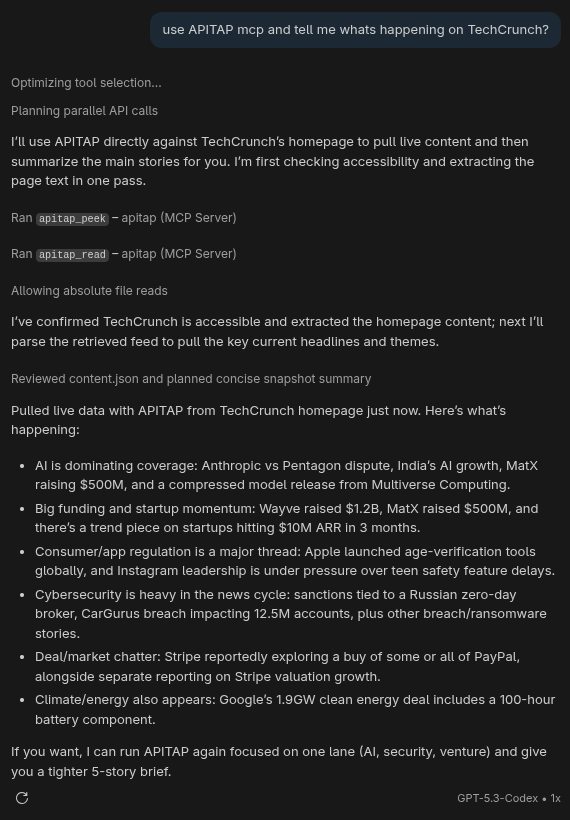
TechCrunch demo screenshot
Browser: ~8,000 tokens → ApiTap: ~200 tokens = 97% reduction
Works in any AI assistant. One command. Live data.
Reddit: 125,805 tokens of HTML → 641 tokens via ApiTap. Same data.
These aren't mock numbers. Run apitap read https://news.ycombinator.com/ yourself and count the tokens.

Your browser already knows the APIs.

Optional Chrome extension. Install it and it silently builds a map of every API you visit — no infobar, no performance hit. Banking, login pages, and payment flows are blocked at collection time — never observed, never stored. For everything else, the index keeps endpoint shapes only: never header values, never query param values, never auth tokens.

🗂️

Passive Index

As you use Discord, Spotify, Notion — the extension silently records endpoint shapes, auth types, and pagination patterns. No capture step. No button to click.

$ apitap index discord.com # discord.com — 8 endpoints, Bearer auth # GET /api/v10/channels/:id (47 hits) # GET /api/v10/guilds/:id/members (12 hits)

Agent Discovery

Agents query the index before capturing. The apitap_discover MCP tool answers "what do you know about X?" instantly, with zero runtime overhead.

🎯

On-Demand Promotion

When a full skill file is needed, the extension briefly attaches, captures response shapes, then detaches. You approve once. It never runs unattended by default.

🔌

CDP Attach Mode

Already have Chrome open with signed-in sessions? Enable remote debugging in one click, then apitap attach passively captures across all tabs — OAuth redirects, SSO flows, multi-domain auth. No extension required.

$ apitap attach --domain *.github.com # GET 200 api.github.com /repos/:owner/:repo # ^C → skill file written + signed
Extension setup guide → Chrome Web Store submission coming soon · Load unpacked for now

Hardened for production.

1427 tests. Defense in depth. Because your agent shouldn't be a liability.

Two commands. Then ask your agent to browse.

terminal

The web was built for human eyes; ApiTap makes it native to machines.